
Best USB-C chargers: my picks by category
-
What are the selection criteria for the best USB charger?
-
The best functionally advanced charging adapter
-
The best PD3.2 AVS SPR charging adapter
-
The best all-round charging adapter
-
The best charging adapter for traveling
-
The best charging adapter up to 100W
-
The best USB car charger
-
The best power bank
What are the selection criteria for the best USB charger?
First of all, it should be noted that the choice of the best charger (adapter) is my subjective opinion based on my own user experience and personal requirements for the quality and functions of the charging adapter.
The adapters presented below are those that I can recommend to everyone without any hesitation and use myself.
The price of the adapter does not affect the rating and selection; only functionality and user characteristics are important. Reference prices are also not given as they are constantly changing and sales are applied.
All adapters have been personally tested by me and demonstrate reliable and stable performance under full load.
An alternative (to the winner in the category) USB adapter is no worse than the main one; it usually has features that make it a more preferable choice in certain usage scenarios or for certain categories of users.
Below are the functional features that are present in each of the winning adapters, as I consider them mandatory, and without them, the title of “best adapter” cannot be obtained, since I will not use an adapter without this functionality (the exception is PD 12V mode, but more on that below):
-
Stable operation under full load from a single port. If the maximum is stated as 100W, it means that it is tested with a load of 100W; if 140W, it means that it must provide 140W. Any of the adapters must withstand many hours of load as a laptop power source, which means that its stable operation under maximum load is absolutely necessary.
-
Reset-free feature. Uninterrupted power supply functionality for devices connected to the charger in the mode when connecting or disconnecting a second/third device. The implementation of this function is important for the next scenarios:
-
Supplying energy to non-battery devices like electronic load, AA chargers, Arduino and Raspberry Pi boards, mini PC, etc. In this scenario, a power cut-off leads to a device reset (reboot).
-
Even if a device like a smartphone or a laptop has a battery, resetting leads to blinking the screen, waking up the device or making a sound.
-
Resetting the power supply leads to charging protocol renegotiation from scratch and ruins the optimal charging curve
-
There is an opinion that multiple charging attempts harm battery health (though I did not find strong evidence of that)
-
-
Optional support for the PD 12V protocol. This is an optional protocol for the PD standard, but it is very convenient, for example, for DIY tasks that require a popular 12V DC power supply, which can be provided by connecting a PD-DC cable with a built-in 12V trigger and using it as a replacement for AC-DC 12V adapters up to 3A. I consider the implementation of this protocol to be very desirable and convenient, but I admit that its availability is not fundamentally important to every consumer, so this factor is optional for the final verdict.
Best feature-rich USB-C charger: Anker Prime 160W (3C)
Winner: Anker Prime 160W (3C)
Why?
-
In addition to being a brand known for its high-quality chargers, Anker has reached new heights with this charger. It's not just a charger, it's a charger with a screen (many different modes), Bluetooth, and a smartphone app.
-
The smartphone app is very convenient and informative. Not only can you see how much power is being supplied to each port with what voltage and current, but you can also select different modes: AI mode, Standard C1 priority, Standard dual laptops, and the most interesting one - Custom.
-
All modes except Custom involve dynamic power distribution between ports, but in Custom mode, you reserve how much power to allocate to each port, ensuring that the connected device will always receive the allocated amount of power and that the charging protocols will be available (this is also indicated).
-
All necessary protocols are supported: PD 3.1 28V5A - 140W, full PPS range up to 21V5A (all smartphones that need PPS, including Google Pixel 9-11 Pro XL and top-of-the-line Samsung models, will charge at the maximum power provided).
-
AVS EPR support (15-28V) - a good foundation for the future.
-
The adapter weighs just over 200g, which is very modest for 160W, and has a foldable EU plug.
-
Class VI energy efficiency.
Why?


Best alternative: SHARGE PIXEL S2U 140W PD 3.1 (3C)
Best PD 3.2 AVS SPR USB-C charger: UGREEN Nexode Pro 160W X774 (4C1A)
Winner: UGREEN Nexode Pro 160W X774 (4C1A)
Why?
-
PD3.2 AVS SPR support on two ports (USB-C1 100W, USB-C3 65W)
-
Foldable plug
-
A display showing power, voltage, current and the charging protocol!
-
Support for the full PPS range up to 21V5A, meaning any Samsung or Google Pixel will charge as fast as possible, and most Chinese-brand smartphones will charge very quickly.
-
Support for PD 3.1 28V5A - 140W - this protocol is useful for modern laptops such as the Apple MacBook Pro 16 and some others.
-
5 USB ports (4C+1A) - the ideal option for charging 5 devices overnight at the same time
-
Class VI energy efficiency. The charger can be left plugged into the outlet.

Best alternative: UGREEN Nexode Pro 100W X772 (3C1A)
Why?
-
This is the "little brother" of the adapter above: it has all its advantages, works reliably, and does not overheat, but is lighter (269g versus 460g for the 160W version) and slightly more compact (64x64mm versus 76x76 with the same thickness)
-
It also has PD3.2 AVS SPR on two ports: USB-C1 (100W) and USB-C3 (65W)

Best all-round USB-C charger: AOHi Magcube 140W (2C1A)
Winner: AOHi Magcube 140W (2C1A)
Why?
-
Support for the full PPS range up to 21V5A, meaning any Samsung or Google Pixel will charge as fast as possible, and most Chinese brand smartphones will charge very quickly.
-
Support for PD 3.1 28V5A - 140W - this protocol is useful for modern laptops such as the Apple MacBook Pro 16 and some others. Also, more and more devices require PD 3.1 support, for example, the Miniware TS101 soldering iron.
-
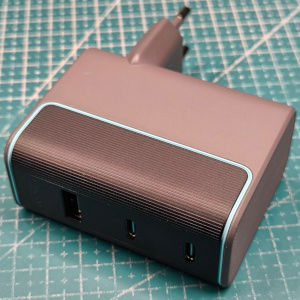
3 USB ports (2C+1A) - the optimal number.
-
USB-A port. This is an advantage that is not obvious to some, but the fact is that there are still many devices around us that have a USB-C port but are not capable of charging using a USB-C to USB-C cable because the PD protocol requires CC lines that may be missing in such devices.
-
Class VI energy efficiency. The charger can be left plugged into the outlet.

Best alternative: SHARGE PIXEL S2U 140W PD 3.1 (3C)
Why?
-
It has the functionality of AOHi Magcube (PPS 21V5A, PD 3.1 140W, Class VI energy efficiency), but:
-
Support for the AVS EPR protocol (15V-28V5A) has been implemented. This is of little use today, but may be useful in the future.
-
All ports are USB-C (no USB-A port)
-
A pixel screen that shows the power output to the ports (the screen can be turned off, although its presence can be annoying)
-
Dimensions are slightly larger than the AOHi Magcube
-
The European plug head does not look very aesthetically pleasing.
Best USB-C travel charger: SlimQ 150W PD 3.1 (3C1A)
Why?
-
Supports PD 3.1 28V5A - 140W. Owners of modern laptops, such as the Apple MacBook Pro 16, will be delighted.
-
Supports PPS 20V5A (unfortunately not 21V, but acceptable for most users).
-
Interchangeable heads (plugs for AC outlets) for different countries' standards.
-
High power + 4 USB ports (3C + 1A) allow you to use one charger for all your gadgets and your whole family when traveling.
-
The presence of a USB-A port is an important option for travel, since many peripherals such as toothbrushes, razors, flashlights, headphones, and other small items are often unable to charge from a USB-C charging port; a USB-A to USB-C cable is required, and it needs to be connected somewhere.
-
Weight: 246g.
-
The adapter is reliable, I've been using it every day for the last 2 years.

Winner: SlimQ 150W PD 3.1 (3C1A)
Best alternative: Anker 100W 2C1A with screen
Why?
-
Weight and dimensions! This adapter weighs just 212g, which is less than the winner (246g), and it’s more compact, partly thanks to its foldable plug.
-
A screen displaying the charging power (not that important on the go, but a handy feature)
-
The adapter performs consistently under a full 100W load
-
100W (PD 20V5A) is currently the most popular USB-C power delivery standard for laptops.
-
Full PPS range support - 21V5A. Any smartphones requiring PPS (Samsung, Google, etc.) will charge at full speed
-
Supports UFCS 33W, which may be important for some Chinese smartphones.
-
Supports Xiaomi Surge Charge 90W even with a standard 5A USB-C to USB-C cable
-
3 ports (2C + 1A) are the bare minimum if this is the only charger you’re packing. If 3 ports aren’t enough for your travels, consider using one of these safe-to-use Y-type cables.
-
Class VI energy efficiency - for those concerned about their carbon footprint.

Best USB-C charger up to 100W: Anker 100W 2C1A with screen
Winner: Anker 100W 2C1A with screen
Why?
-
A screen displaying the charging power for each port.
-
The adapter performs consistently under a full 100W load
-
100W (PD 20V5A) is currently the most popular USB-C power delivery standard for laptops.
-
Full PPS range support - 21V5A. Any smartphones requiring PPS (Samsung, Google, etc.) will charge at full speed
-
Supports UFCS 33W, which may be important for some Chinese smartphones.
-
Supports Xiaomi Surge Charge 90W even with a standard 5A USB-C to USB-C cable
-
3 USB ports (2C+1A). Optimal for a 100W charging adapter.
-
USB-A port, suitable for peripherals that do not support the PD protocol.
-
The only drawback is the lack of PD 12V support.
-
Class VI energy efficiency - for those concerned about their carbon footprint.
Best alternative: CUKTECH 100W (2C1A)
Why?
-
PD 3.0 20V5A support - 100W. The most popular power rating available for most laptops on the market that charge via the PD protocol (with some exceptions in top models).
-
Supports PPS up to 20V5A (unfortunately not 21V, but acceptable for most users, including Samsung S26 Ultra owners).
-
Supports Xiaomi Surge Charge 100W even with a standard 5A USB-C to USB-C cable
-
Supports UFCS 33W (USB-A port), which is useful for some Chinese smartphones
-
3 USB ports (2C+1A). Optimal for a 100W charging adapter.
-
USB-A port, suitable for peripherals that do not support the PD protocol.
-
Class VI energy efficiency. The charging adapter can be left plugged into the outlet.
Best USB-C car charger: AOHi Superauto 170W PD 3.1 (2C1A)
Why?

Why?
-
Very compact charger! It conceals completely into the cigarette lighter socket and doesn't detract from the car's interior.
-
It handles a full 45W load.
-
Supports PPS 5-11V5A; with a 5A-rated cable (100W/240W), this allows all top-tier Samsung models to charge at full speed (Super Fast Charge 2.0).
-
Supports proprietary protocols such as VOOC, SVOOC, and TFCP, as well as many other common protocols, including QC, AFC, FCP, SCP, and more.
-
2 USB ports (USB-C and USB-A)

Best alternative: AOHi Superauto 45W (1C1A)
Best power bank: SHARGE SHARGEEK 170 24k mAh 170W
Why?
-
Operates reliably at a load of 140W from 100% to 0% (the best performance of any power bank tested)
-
IP66 protection rating
-
Reset-free functionality
-
Simultaneous charging and discharging (pass-through)
-
CCC certification for flights within China
-
Support for the full PPS range - 21V5A
-
Trickle charging
-
Supports PD 12V
-
It’s simply a beautiful device that’s not only a pleasure to use, but also to look at

Why?
-
A compact and very lightweight power bank (160g)!
-
You shouldn’t expect it to last long when charging a 45W device, but it delivers a stable 30W output
-
Thanks to PPS support up to 11V5A, it can charge top-of-the-line Samsung models (Plus/Ultra) at maximum speed
-
An original and convenient solution for attaching the 100W cable to act as a carrying lanyard
-
The power bank body is available in a wide range of colors
Best alternative: INIU P50-E1 10000mAh 45W (2C1A)
